
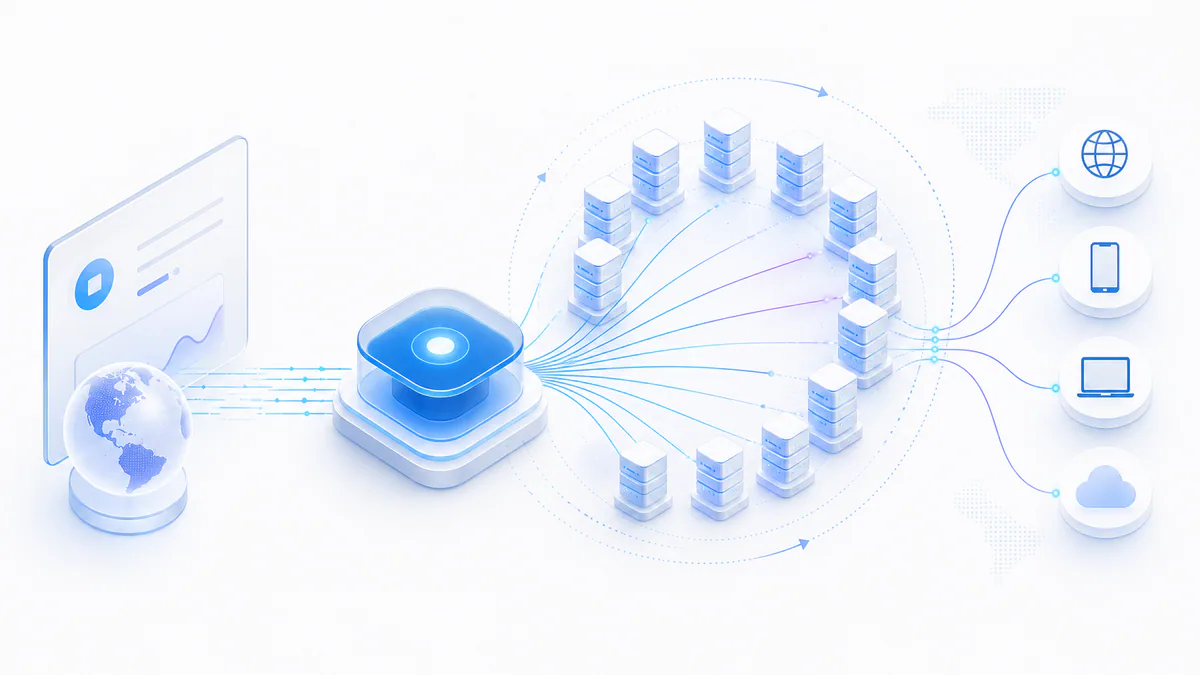
A backconnect proxy is a proxy gateway that connects your application to a pool of multiple proxy IP addresses. Instead of configuring and rotating individual proxies yourself, you connect to one host and port while the backconnect server selects an exit IP behind the scenes. Depending on the service, the exit IP can change with every request, after a time interval, or remain temporarily fixed through a sticky session.
| Connection | One stable proxy gateway |
|---|---|
| Exit IPs | A pool of multiple proxy IP addresses |
| Rotation | Automatic, provider-managed |
| Rotation modes | Per request, timed, or sticky session |
| Common IP types | Datacenter, residential, mobile, and ISP |
| Common uses | Scraping, monitoring, research, and automation |
| Main advantage | No manual proxy-list rotation in the client |
- Backconnect describes the gateway architecture: your application connects to one endpoint while the exit proxy is selected from a larger pool behind it.
- Rotating describes IP behavior. A backconnect gateway usually provides rotation, but the two terms are not technically identical.
- Rotation can happen for every request, on a timed schedule, or through sticky sessions that keep one exit IP for a limited period.
- Backconnect pools can contain datacenter, residential, mobile, or ISP proxies; the gateway model does not determine the underlying IP type.
- The architecture is most useful when scalability and automatic IP management matter more than controlling one specific proxy IP.
What Is a Backconnect Proxy?
A backconnect proxy is a gateway that sits between your application and a pool of proxy servers. Your software connects to the same gateway address, while the provider decides which backend proxy IP will carry each request. The result is a simple client configuration even when the underlying proxy network contains hundreds, thousands, or more exit addresses.
The most important idea is this: the gateway can remain constant while the exit IP changes. Your scraper, browser, crawler, monitoring service, or other application does not need to download a new proxy list every time the pool changes. It talks to the gateway, and the gateway handles proxy selection and rotation.
Backconnect is therefore an architecture rather than an IP category. A provider can build a backconnect gateway in front of datacenter, residential, mobile, or ISP proxy pools. The type of exit IP determines characteristics such as speed, cost, network identity, and geographic availability; the backconnect layer determines how you access and rotate those exits.
ProxyTitan product
Looking for the commercial service rather than the technical explanation? Explore ProxyTitan Backconnect Proxies
The Backconnect Gateway
The gateway is the front-facing endpoint that your application knows about. It is commonly represented as a hostname and port, optionally combined with username-and-password credentials. Behind that endpoint is routing logic that can authenticate the request, apply account limits, select a location or pool, choose a healthy exit, and decide whether the current session should keep or change its IP.
A production gateway can also abstract infrastructure changes. If a backend proxy goes offline, is removed from rotation, or is replaced by another server, the client configuration does not necessarily need to change. This separation between the client-facing endpoint and backend proxy pool is one of the architecture’s main operational advantages.
Backconnect Proxy vs. an Individual Proxy IP
With a traditional proxy list, an application might receive many individual host-and-port combinations and implement selection, retries, health tracking, and rotation itself. With a backconnect service, the application usually receives one gateway endpoint and delegates most of that logic to the provider.
Neither approach is automatically better for every project. Individual proxies offer more direct control over exactly which IP is used. Backconnect gateways reduce client-side management and are usually easier to scale when requests should be distributed across a larger pool.
| Area | Individual Proxy IPs | Backconnect Gateway |
|---|---|---|
| Client configuration | Many endpoints may need to be stored | Usually one gateway endpoint |
| IP selection | Handled by the client | Handled by the gateway |
| Rotation logic | Implemented by the client or external software | Provider-managed |
| Failed proxy handling | Often requires client-side retry logic | Can be abstracted by the gateway |
| Direct IP control | High | Usually lower |
| Scaling a large pool | More client-side management | Simpler client configuration |
How Do Backconnect Proxies Work?
A backconnect request adds a routing layer between the client and the final proxy IP. The client establishes a connection to the gateway, the gateway selects an exit proxy from its pool, and that exit communicates with the destination. The response travels back through the same route to the client.
The exact implementation varies by provider, but the core model is consistent: one client-facing endpoint controls access to many backend proxy addresses. The provider can apply rotation rules centrally instead of requiring every customer application to maintain its own proxy scheduler.
Backconnect Proxy Request Flow
On a simple per-request rotation setup, two consecutive requests can reach the same website from different exit IPs even though both requests were sent to the same gateway host and port. With a sticky session, the gateway associates a session identifier or other session key with one exit for a defined period so that related requests keep the same IP.
For HTTPS traffic, a client often uses the HTTP CONNECT method to ask the proxy to establish a tunnel to the destination. SOCKS5 uses a different handshake, but the same high-level backconnect concept still applies: the gateway accepts the client connection and routes it through a selected backend exit.
What Happens Behind the Gateway?
A well-managed backconnect service does more than choose a random IP. The routing layer can take account permissions, protocol, requested country, connection limits, active load, backend health, cooldown status, and session settings into account before selecting an exit.
Health checks and failure handling are especially important at scale. If a backend proxy repeatedly times out or refuses connections, continuing to send traffic to it increases retry rates and makes the entire pool look unreliable. Providers can temporarily remove unhealthy exits, return them after recovery, and spread new connections across healthier infrastructure.
This does not mean every backconnect provider uses the same algorithm or offers the same reliability. Gateway quality, IP quality, capacity planning, routing policy, and monitoring still determine how well the service performs in practice.
Common gateway responsibilities
- Authenticate IP-based or username-and-password access.
- Apply account and concurrent-connection limits.
- Select an eligible proxy pool and exit IP.
- Respect per-request, timed, or sticky-session rules.
- Avoid or cool down unhealthy backend proxies.
- Route HTTP(S) or SOCKS5 traffic to the selected exit.
- Collect usage and operational statistics.
Why Is It Called a Backconnect Proxy?
The term “backconnect” is commonly used for a proxy setup where the customer connects to a front-facing gateway and that gateway routes the connection onward through one of many backend proxy servers. From the customer’s perspective, the gateway is the stable access point and the proxy network sits behind it.
The name can be confusing because it sounds like a special proxy protocol. It is not. Backconnect proxies can expose familiar HTTP, HTTPS tunneling, or SOCKS5 interfaces. What makes the service “backconnect” is primarily the gateway-to-pool architecture and provider-managed routing behind that gateway.
Backconnect Proxy Rotation Explained
Automatic rotation is why backconnect proxies are often discussed together with rotating proxies. The gateway can choose when a client should receive a new exit IP, allowing one endpoint to support very different session behaviors.
The right rotation mode depends on the application. Stateless collection jobs may benefit from frequent changes, while workflows that depend on cookies, logins, carts, or multi-step navigation usually need more session continuity.
Per-Request Rotation
With per-request rotation, the gateway is allowed to select a different exit for each new request or connection. A simplified sequence could be Request 1 → IP A, Request 2 → IP B, and Request 3 → IP C.
This mode is useful for independent requests where there is no expectation that multiple requests come from one persistent identity. It can distribute traffic across a pool efficiently, but it is a poor fit for workflows that break when the source IP changes between steps.
Time-Based Rotation
Time-based rotation keeps an exit IP for a defined window and then permits or forces a change. For example, a session could remain on one exit for several minutes before the gateway assigns another IP.
This approach sits between per-request rotation and long-lived static proxies. It offers temporary continuity while still rotating identities over a longer job.
Sticky Sessions
A sticky session tells the proxy service to keep the same exit IP for related requests, normally for a limited duration or until the session is released. Providers implement this in different ways, such as session identifiers encoded in the username, dedicated session parameters, or a session-aware gateway port.
Sticky sessions are important for multi-step browsing and authenticated workflows because abrupt IP changes can look inconsistent or invalidate a session. They do not make an IP permanent: if the exit fails, the provider may need to replace it, and every service defines its own maximum session duration.
Use sticky sessions when
- Several requests must appear to come from the same temporary network identity.
- A workflow depends on cookies, a shopping cart, login state, or multi-step navigation.
- You want controlled rotation instead of changing the IP on every request.
Backconnect Proxies vs. Rotating Proxies
Backconnect proxies and rotating proxies overlap heavily, but the terms describe different properties. Backconnect describes how the client accesses a proxy pool through a gateway. Rotating describes the behavior of changing exit IP addresses over time.
A backconnect gateway normally includes rotation because automatic proxy selection is one of its main benefits. However, rotation can also be implemented without a backconnect gateway—for example, when an application cycles through a downloaded list of individual proxy endpoints itself.
Related guide
For a deeper explanation of the rotation concept itself, read What Are Rotating Proxies?
| Question | Backconnect Proxy | Rotating Proxy |
|---|---|---|
| What does the term describe? | Gateway architecture | IP-changing behavior |
| One stable gateway? | Usually | Not required |
| Automatic IP changes? | Common, but policy depends on service | Yes, by definition |
| Can sticky sessions exist? | Yes | Yes |
| Can the client rotate a manual list? | Usually unnecessary | Yes |
| Best mental model | How you access the pool | What happens to the exit IP |
Backconnect Proxies vs. Regular Proxy Lists
A regular proxy list gives the client explicit endpoints. That can be useful when you need to pin work to specific IPs, score each proxy yourself, or implement a custom rotation algorithm. The tradeoff is additional client-side state and operational logic.
A backconnect service moves more of that responsibility to the provider. The application can remain configured with the same gateway while the provider changes the backend pool. This is particularly convenient for distributed scrapers, scheduled monitoring jobs, and systems where many workers would otherwise need synchronized proxy lists.
Detailed comparison
If you are deciding between a traditional setup and a gateway-based pool, compare Standard vs. Backconnect Proxies
| Feature | Backconnect Gateway | Regular Proxy List |
|---|---|---|
| Endpoints exposed to client | Usually one or a small set of gateways | Many individual proxies |
| Rotation | Gateway-managed | Client-managed unless another tool is used |
| Backend replacement | Can be transparent to client | List often needs updating |
| Per-IP control | Lower | Higher |
| Scaling many workers | Simpler configuration | Requires list distribution/state |
| Custom scoring logic | Provider-dependent | Fully client-controlled |
Types of Backconnect Proxies
Backconnect does not tell you whether an exit IP is datacenter, residential, mobile, or ISP-based. Those labels describe the network origin and characteristics of the IPs behind the gateway. A provider can use the same basic gateway model for several different proxy pools.
Choosing the underlying proxy type matters because it affects performance, price, location coverage, network reputation, and the kinds of workloads for which the pool is suitable.
| Proxy Type | Typical Strengths | Typical Tradeoffs | Common Fit |
|---|---|---|---|
| Datacenter | High speed, high throughput, predictable infrastructure, lower cost | Easier to identify as hosting/datacenter traffic | Large-volume automation and public-data collection |
| Residential | ISP-issued consumer IP space and broad location diversity | Higher cost and often bandwidth-based pricing | Geo-sensitive collection and consumer-web testing |
| Mobile | Addresses associated with mobile carrier networks | Usually the highest cost and more complex capacity | Mobile-specific testing and carrier-network scenarios |
| ISP | Datacenter-like hosting with IP space registered to ISPs in many products | Availability and rotation characteristics vary by provider | Longer sessions requiring stable, higher-trust IP identities |
Datacenter Backconnect Proxies
Datacenter backconnect proxies route traffic through IP addresses hosted in server and datacenter networks. They are attractive when raw speed, high concurrent connection capacity, predictable routing, and cost efficiency matter.
They are a strong fit for many high-volume collection and monitoring systems, but target services can often recognize that an IP belongs to a hosting network. IP rotation therefore reduces repeated use of one address but does not make datacenter traffic indistinguishable from a residential connection.
Residential Backconnect Proxies
Residential backconnect services route traffic through IP addresses associated with consumer internet service providers. They often provide broad country or city coverage and large rotating pools.
Residential networks generally cost more than datacenter pools and are frequently billed by transferred data. Ethical sourcing and clear consent practices are important considerations when evaluating any residential proxy provider.
Mobile Backconnect Proxies
Mobile proxy pools use IP space associated with cellular carriers. Multiple subscribers can appear behind carrier-grade NAT, which gives mobile IPs different network characteristics from typical datacenter addresses.
Mobile capacity is usually more expensive, so it is most appropriate when the application specifically benefits from mobile-network identity rather than simply needing fast rotation.
ISP Backconnect Proxies
ISP proxy products are commonly marketed as combining hosted proxy infrastructure with IP ranges registered to internet service providers. They can provide more stable sessions than aggressively rotating residential pools while maintaining high infrastructure performance.
The term “ISP proxy” is used differently across providers, so buyers should verify who owns the address space, whether the IP is exclusive or shared, how rotation works, and what session persistence is actually guaranteed.
Advantages of Backconnect Proxies
The biggest benefit of backconnect architecture is operational simplicity. A client can use one gateway while the provider manages a much larger and changing set of backend exits. That reduces the amount of proxy-specific logic each application has to implement.
The architecture is especially useful when a workload grows. Adding more capacity to the provider-side pool does not necessarily require customers to distribute new proxy lists to every worker, server, or scheduled job.
Automatic IP Rotation
Rotation policies are centralized at the gateway. Clients can send traffic without manually selecting a new proxy for every request, which reduces repeated boilerplate logic across applications.
Easier Proxy Management
A stable hostname and port are easier to deploy than a large endpoint list. Backend additions, removals, and health changes can happen behind the gateway without requiring every client to understand the entire pool.
Scalable Concurrent Connections
Backconnect gateways can distribute simultaneous client connections across multiple backend proxies, provided the account plan and infrastructure have sufficient capacity. This can support many parallel workers without all of them targeting one exit IP.
Health Checks and Failover
Providers can monitor backend failures and temporarily avoid weak exits. This does not eliminate errors, but it gives the service a central place to react to unhealthy infrastructure instead of leaving every client to rediscover the same problem independently.
Geographic Targeting
If the provider maintains location-specific pools, the gateway can use account parameters, usernames, ports, or API settings to select proxies from a requested country or region. Exact targeting granularity depends on the available network.
Disadvantages and Limitations of Backconnect Proxies
Backconnect proxies simplify rotation, but they are not automatically the best solution for every network task. Moving routing decisions to the provider means giving up some direct control, and adding a gateway introduces another infrastructure layer that must remain reliable.
It is also important not to treat IP rotation as a universal solution to website blocking. Modern services can evaluate many signals beyond the source IP, including cookies, request rate, TLS characteristics, browser fingerprints, account behavior, navigation patterns, and application-level identifiers.
Less Control Over Individual Exit IPs
A gateway normally decides which eligible exit is used. If your workflow requires a known, permanent IP or custom scoring of every individual proxy, a manually managed static pool may provide better control.
Shared IP Reputation
In shared pools, another customer’s behavior can affect the reputation of an exit IP. Providers can mitigate this with monitoring and pool management, but shared reputation is still a factor to evaluate.
Additional Gateway Latency
Proxy traffic already adds network hops compared with a direct connection. A backconnect gateway can add another routing decision or network hop. A well-engineered service keeps this overhead small, but latency still depends on gateway location, exit location, target location, and network congestion.
Rotation Can Break Sessions
Changing IPs too frequently can disrupt websites that expect a session to remain on one network identity. Sticky sessions or a static proxy are better when multiple related requests must stay consistent.
Rotation Does Not Prevent Every Type of Blocking
If an application sends unrealistic request patterns, ignores rate limits, reuses a blocked account, or exposes a distinctive browser fingerprint, switching IP addresses alone may not solve the problem. Reliable automation requires appropriate pacing, error handling, session management, and compliance with the destination’s rules and applicable law.
What Are Backconnect Proxies Used For?
Backconnect gateways are most useful when an application must make many independent or semi-independent connections and should not manually manage a large proxy list. Common examples include public-data collection, monitoring, verification, research, and location-aware testing.
The right proxy type and rotation policy still depend on the target system and the purpose of the project. High-speed datacenter pools can be ideal for some public resources, while geo-sensitive or session-sensitive tasks may require a different exit type or stickier behavior.
Web Scraping and Public-Data Collection
Scrapers can send requests to one gateway while the proxy service distributes them across multiple exits. This simplifies worker configuration and can reduce repeated traffic from one IP. Respect robots directives where applicable, site terms, access controls, rate limits, and legal requirements for the data you collect.
Price and Product Monitoring
Businesses can use proxy pools to check publicly visible prices, availability, and product information from different network locations. A backconnect endpoint is convenient when scheduled jobs run continuously across many pages.
SEO and SERP Monitoring
Search-result monitoring tools often need repeated queries across locations and keywords. Gateway-based rotation can simplify distributed checks, while location-specific pools can help observe regional differences when the provider supports them.
Ad Verification
Advertisers and agencies can verify how public advertisements, landing pages, or localized campaigns appear from different network locations. Session and geographic controls matter more than raw rotation for many verification workflows.
Market Research
Automated research systems can collect publicly accessible market signals from many pages without tying every request to one exit address. Centralized proxy management is useful when the research pipeline runs across multiple servers or workers.
Localization Testing
Teams can test whether public content, language, currency, or regional variants change by location. The value comes from having access to the correct geographic exit pool rather than rotation alone.
When Should You Not Use a Backconnect Proxy?
A backconnect gateway is a tool for managed proxy pools, not a requirement for every proxy use case. If your application needs one stable and explicitly known address, frequent or provider-controlled rotation may create more complexity than it solves.
Consider a static or individually managed proxy instead when
- A third party must allowlist one permanent source IP.
- A long-lived authenticated session cannot tolerate an exit change.
- You must know and control the exact proxy IP used for every job.
- The workload is very small and a single reliable proxy is sufficient.
- Ultra-low latency matters more than rotation or proxy-pool scale.
- Your own application already has sophisticated proxy scoring, health checks, and rotation logic that you want to keep fully client-side.
How to Use a Backconnect Proxy
From the client side, using a backconnect proxy usually looks similar to using any other HTTP or SOCKS5 proxy. The main difference is that the hostname and port represent a gateway rather than one permanent exit IP.
Providers commonly support IP-based authentication, username-and-password authentication, or both. The exact credential format, rotation parameters, location targeting, and session syntax are provider-specific, so always follow the service documentation.
Host, Port, and Authentication
A simple endpoint may look like proxy.example.com:8000. With credentials, applications often use a URL such as http://username:[email protected]:8000. If IP authentication is enabled, the gateway can authorize the connecting server without embedding credentials in the proxy URL.
Never hard-code production proxy passwords into public repositories. Store them in environment variables, secret stores, or another appropriate configuration system.
proxy.example.com:8000

username:[email protected]:8000

http://username:[email protected]:8000
cURL Example
This example sends an HTTPS request through an HTTP proxy gateway. Replace the placeholder credentials and hostname with the values from your provider.
curl \
  --proxy http://proxy.example.com:8000 \
  --proxy-user "username:password" \
  https://api.ipify.org?format=json
Python Example
Python’s requests library can use the same gateway for both HTTP and HTTPS URLs. A per-request rotating service may return a different public exit IP on separate requests while the proxy URL remains unchanged.
import os
import requests

proxy_user = os.environ["PROXY_USER"]
proxy_pass = os.environ["PROXY_PASS"]

proxy_url = (
    f"http://{proxy_user}:{proxy_pass}"
    "@proxy.example.com:8000"
)

proxies = {
    "http": proxy_url,
    "https": proxy_url,
}

response = requests.get(
    "https://api.ipify.org?format=json",
    proxies=proxies,
    timeout=15,
)

print(response.json())
SOCKS5 Example
If the gateway supports SOCKS5, use a SOCKS5-aware client. The socks5h scheme in cURL tells cURL to resolve the destination hostname through the proxy instead of resolving it locally.
curl \
  --proxy socks5h://proxy.example.com:1080 \
  --proxy-user "username:password" \
  https://api.ipify.org?format=json
How to Test Backconnect Proxy IP Rotation in Practice
The best way to verify a backconnect service is to measure it. Send a controlled series of requests through the same gateway to an IP-echo endpoint and record the exit IP, response time, failures, and session behavior. This demonstrates what the gateway actually does instead of relying only on marketing claims.
Do not assume that 100 requests should always produce 100 unique IPs. Pool size, rotation policy, country selection, sticky settings, availability, and provider algorithms can all cause an address to reappear. The useful metrics are whether the behavior matches the advertised rotation policy and whether the success rate and latency fit your workload.
| Metric | What to Record | What It Tells You |
|---|---|---|
| Successful requests | Count and percentage | Basic gateway reliability during the sample |
| Unique exit IPs | Distinct addresses observed | How much rotation occurred in that test |
| IP reuse | How often an exit repeated | Whether the pool/algorithm revisits addresses |
| Median latency | Median request duration | Typical rather than worst-case performance |
| P95 latency | 95th-percentile duration | Tail latency under less favorable routes |
| Session consistency | Whether sticky requests keep one IP | Whether sticky mode behaves as expected |
Simple Python Rotation Test
The following script sends repeated requests through one gateway and prints the observed exit IP. Use a small, reasonable sample and follow the IP-echo service’s usage rules. For a publishable benchmark, also record timestamps, latency, protocol, requested location, rotation mode, and test date.
import os
import time
import requests

proxy_url = (
    f"http://{os.environ['PROXY_USER']}:"
    f"{os.environ['PROXY_PASS']}"
    "@proxy.example.com:8000"
)

proxies = {
    "http": proxy_url,
    "https": proxy_url,
}

observed_ips = []

for request_no in range(1, 11):
    started = time.perf_counter()

    response = requests.get(
        "https://api.ipify.org?format=json",
        proxies=proxies,
        timeout=15,
    )
    response.raise_for_status()

    latency_ms = (time.perf_counter() - started) * 1000
    exit_ip = response.json()["ip"]
    observed_ips.append(exit_ip)

    print(
        f"{request_no:02d}  "
        f"ip={exit_ip:<15}  "
        f"latency={latency_ms:.0f}ms"
    )

print("Unique IPs:", len(set(observed_ips)))
For a Stronger Guide, Publish Real Results
If you operate the proxy infrastructure yourself, this section is an opportunity to add first-hand evidence that generic articles cannot easily reproduce. Publish a dated test with the actual gateway mode, sample size, successful-request rate, unique exits, median latency, P95 latency, and any important test limitations.
Use real measurements only. A transparent benchmark with modest results is more credible than invented “100% success” claims, and it gives readers a repeatable method they can use to validate their own setup.
How to Choose a Backconnect Proxy Provider
A large advertised IP number does not tell you whether a backconnect service will work well for your application. Evaluate the gateway and the underlying proxy pool together. A smaller, healthy, well-routed pool can be more useful than a very large pool with poor availability or inconsistent performance.
Testing with your own target mix and request patterns is the most reliable way to compare providers. Use a trial or small plan where possible, and measure success rate, latency, session behavior, concurrency, and support responsiveness before moving a critical workload.
Practical next step
If high-speed datacenter rotation is your main requirement, review ProxyTitan Backconnect Proxies
| Check | Questions to Ask |
|---|---|
| IP pool | What proxy types, countries, and networks are actually available? |
| Rotation | Per request, timed, sticky, or configurable? |
| Sticky sessions | How are sessions created and how long can they persist? |
| Protocols | HTTP, HTTPS tunneling, SOCKS5, or all of them? |
| Concurrency | What are the per-account or per-plan connection limits? |
| Bandwidth | Unlimited, capped, fair-use, or billed per GB? |
| Authentication | IP allowlist, username/password, or both? |
| Health management | How are failing exits detected and removed from routing? |
| Location targeting | Country, region, city, ASN, or provider-specific options? |
| Documentation | Are setup examples and error behaviors clearly documented? |
| Support | Can the provider help diagnose routing and connection issues? |
| Compliance | Are acceptable-use rules and sourcing practices clearly explained? |
Conclusion: Backconnect Proxies Simplify Access to Rotating Proxy Pools
A backconnect proxy gives an application one gateway to a larger proxy pool. The client keeps a simple endpoint while the provider handles backend selection, rotation, session rules, and—depending on the implementation—health and failover logic. That architecture is particularly useful when many requests or workers would otherwise need to manage large proxy lists themselves.
The key distinction is easy to remember: backconnect describes how you access the pool; rotating describes what happens to the exit IP. The gateway can sit in front of datacenter, residential, mobile, or ISP proxies, and the best choice depends on speed, location, session, cost, and network-identity requirements.
Use per-request rotation for independent requests, sticky sessions when related requests must stay on one temporary IP, and static proxies when you need a permanent or explicitly allowlisted address. Most importantly, test the service with your real workload instead of choosing only by advertised pool size.
Backconnect Proxy FAQ
These short answers cover the questions that commonly appear when people first compare backconnect, rotating, static, residential, and datacenter proxy setups.
Use one gateway instead of managing proxy lists manually
Explore ProxyTitan backconnect proxies when you need rotating datacenter IPs, HTTP(S) and SOCKS5 connectivity, scalable concurrent connections, and a simple gateway-based setup.